

Effortless Windows Package Management: Getting Started with WinGet
Your Complete Guide to WinGet: Streamline Your Windows Experience

Introduction
The Windows Package Manager (winget) is a robust utility from Microsoft, designed as an equivalent to Linux's apt-get. This powerful tool enables users to automate software installations and upgrades directly through the command line interface (CLI), streamlining the process of managing applications on Windows.
Enhanced Installation Guide
I've outlined five potential methods for installing this utility. After attempting each one, verify the installation by running winget --version to check if it's successfully installed.
Feeling Lucky? Begin your adventure by opening PowerShell. Verify the installed version with a quick spell:
winget -vStill Riding Your Luck? Let's get straight to business. Register the package with this magical incantation:
Add-AppxPackage -RegisterByFamilyName -MainPackage Microsoft.DesktopAppInstaller_8wekyb3d8bbweFull Gear Method Ready for a bit more of a challenge? Brace yourself and follow these commands to add all necessary dependencies and the
wingetitself.$progressPreference = 'silentlyContinue' Write-Information "Commencing download of WinGet and its mystical dependencies..." Invoke-WebRequest -Uri https://aka.ms/getwinget -OutFile Microsoft.DesktopAppInstaller_8wekyb3d8bbwe.msixbundle Invoke-WebRequest -Uri https://aka.ms/Microsoft.VCLibs.x64.14.00.Desktop.appx -OutFile Microsoft.VCLibs.x64.14.00.Desktop.appx Invoke-WebRequest -Uri https://github.com/microsoft/microsoft-ui-xaml/releases/download/v2.7.3/Microsoft.UI.Xaml.2.7.x64.appx -OutFile Microsoft.UI.Xaml.2.7.x64.appx Add-AppxPackage Microsoft.VCLibs.x64.14.00.Desktop.appx Add-AppxPackage Microsoft.UI.Xaml.2.7.x64.appx Add-AppxPackage Microsoft.DesktopAppInstaller_8wekyb3d8bbwe.msixbundleColleague's Envy: Noticed a colleague with a working version? Sneak a peek and grab it here: microsoft/winget-cli.
Plan C (The Last Resort): If all else fails, consider this your nudge towards a clean slate. Sometimes a fresh and latest copy of Windows is the way to go. In the meantime, Microsoft suggests a simpler step: head over to the MS Store and install the
App Installerby Microsoft. Doing so should also install the winget CLI. Find your digital lifeline apps.microsoft.com.
Basic commands overview
WinGet operates through a command-line interface (CLI), allowing you to search, install, upgrade, and manage packages directly from your shell.
winget find <myName> # To find the package.
winget add <myName> # Once you've located the package you want to install.
winget ls # To see what's already installed on your system.
winget update <myName> # To upgrade an installed package.
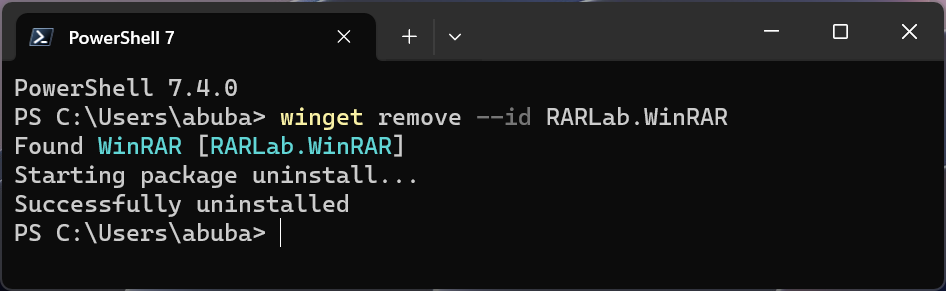
winget remove <myName> # To uninstall an installed package.
Basic Usage of WinGet
Winget Find Command: Use this command to search for specific packages. It's the first step in identifying the software or tool you need.

Winget Add Command: Ready to install a package? This command allows you to add it to your system swiftly and efficiently.

Winget List Command: Curious about what's already installed on your system? Use this command to display a list of all installed packages, helping you manage your installations.

Winget Update Command: Keep your software up-to-date with the update command. It's essential for security and accessing the latest features.

Winget Remove Command: Need to declutter or free up space? This command allows you to remove unwanted or obsolete packages from your system.
Advanced Features
WinGet now facilitates not only the fundamental requirements of software management but also complex scenarios tailored to advanced users. These features include the ability to install specific versions of software, maintain consistent versions across updates, and streamline the setup of new machines by exporting and importing a list of software.
Version Locking
winget pin: This command prevents unwanted updates by locking a package to its current version, ensuring stability and consistency in your software suite.

Exporting and Importing Packages: Streamline the replication of your environment on another machine by exporting and importing a comprehensive list of your installed packages.
Export Packages: Seamlessly create a file listing all your installed packages, complete with version details. This file can then be used to duplicate your setup elsewhere.
winget export --include-versions -o winget-packages.jsonSample
winget-packages.json{ "$schema" : "https://aka.ms/winget-packages.schema.2.0.json", "CreationDate" : "2023-12-28T13:36:42.574-00:00", "Sources" : [ { "Packages" : [ { "PackageIdentifier" : "Postman.Postman", "Version" : "10.21.0" }, { "PackageIdentifier" : "Spotify.Spotify", "Version" : "1.2.14" }, { "PackageIdentifier" : "RARLab.WinRAR", "Version" : "6.22.0" } ], "SourceDetails" : { "Argument" : "https://cdn.winget.microsoft.com/cache", "Identifier" : "Microsoft.Winget.Source_8wekyb3d8bbwe", "Name" : "winget", "Type" : "Microsoft.PreIndexed.Package" } } ], "WinGetVersion" : "1.6.3482" }Import Packages: Effortlessly set up a new machine or restore your setup by importing the package list you've exported.
winget import -i winget-packages.json
Conclusion
Windows Package Manager (winget) is a robust tool that significantly simplifies the process of managing software on Windows systems. By automating the mundane tasks of software management, it frees up time and reduces the complexities involved in maintaining your system. As you become more familiar with its commands and features, you'll find it an indispensable tool in your Windows environment, whether you're a DevOps Engineer, system administrator, or just a developer looking to streamline your setup.
Next Steps:
Windows Command Line Blogs Regularly visit 'commandline' section to remain informed about the latest updates, features, and community insights concerning the winget CLI.
Package Manager - Microsoft Learn By diving into the available resources, you'll uncover a multitude of ways WinGet can streamline and enhance your software management practices. Start exploring now to unlock the full potential of WinGet in your development workflow!
